C# - Overview
In This Topic
Referencing the HttpWatch Automation Library
In a .NET Framework project in Visual Studio, add a reference to the HttpWatch automation library before using its types.
The HttpWatch automation library is packaged as a COM component, so add it in the same way as any other COM reference:
-
Choose Project > Add Reference in Visual Studio.
-
In Reference Manager, select COM.
-
Find and select HttpWatch Automation Library, as shown here:
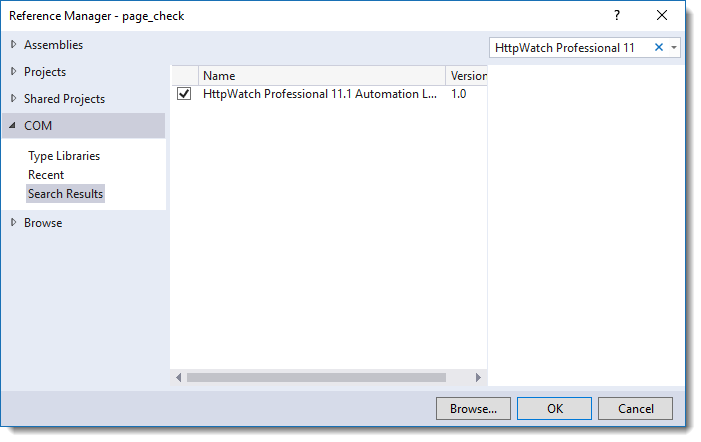
After it is added, the COM reference appears under the project's Dependencies or References node, depending on the project type.
HttpWatch Namespace
The namespace for the library is HttpWatch. Source code modules that access the library must either contain a using statement that references the library:
| Referencing the HttpWatch namespace |
Copy Code
|
|---|---|
using HttpWatch; // Reference the HttpWatch namespace ... Controller controller = new Controller(); |
|
or else each reference to a class in the library must be prefixed by the namespace name:
| Opening a Log File |
Copy Code
|
|---|---|
// Qualify each class reference with "HttpWatch." HttpWatch.Controller controller = new HttpWatch.Controller(); HttpWatch.Log log = controller.OpenLog(@"c:\temp\test.hwl"); |
|
Communicating with the HttpWatch Extension
You can only directly create an instance of one class in the library - the Controller class.
All communication with the HttpWatch extension stems from this class, so the first step is to create an instance of it:
| Creating the Controller |
Copy Code
|
|---|---|
// Controller is the only creatable class in the HttpWatch automation interface HttpWatch.Controller controller = new HttpWatch.Controller(); |
|
It is possible to use ControllerClass instead of Controller as the object type. ControllerClass is effectively an alias for Controller, created by the process of importing the Type Library into the .NET environment. However, Controller is the preferred usage.
Having created a Controller object, the next step is to create an instance of the extension and attach it to a browser instance. The exact code depends on whether you are using Edge or Chrome, but the principles are the same in either case. The Controller object has a property named Chrome. This property returns a reference to the Chrome object.
The Chrome and Edge objects have a New method that creates a new instance of the browser with the HttpWatch extension enabled for automation.
The following code creates a new instance of Chrome with the HttpWatch extension:
| Creating the HttpWatch extension for Chrome |
Copy Code
|
|---|---|
HttpWatch.Controller controller = new HttpWatch.Controller();

HttpWatch.Plugin plugin = controller.Chrome.New();
|
|
| Creating the HttpWatch extension for Edge |
Copy Code
|
|---|---|
HttpWatch.Controller controller = new HttpWatch.Controller();

HttpWatch.Plugin plugin = controller.Edge.New();
|
|
All of these code fragments return a reference to a Plugin object, through which the HttpWatch extension can be controlled.
See Also